
GlimmerGear
GlimmerGear
About
GlimmerGear is a third person 3D platformer built solo in Unity with C#, made as the final project for my advanced diploma. It started as a hybrid between a platformer and a kart racer, with the idea that you could swap between walking and driving at any moment. The platforming half is where most of the work ended up: a Rigidbody character controller with a movement state machine, ledge grabbing, a dash, a ground pound, a coin economy and NPC dialogue. The kart half got a lot of work too, including Mario Kart style drift charging and mini turbos, but it never reached the same level as the rest, so it stayed in as a secondary mode.
Project Info
- Role: Solo Developer
- Team Size: 1
- Time frame: May - June 2024 (~1 month)
- Engine: Unity 2023.3
Acerca de
GlimmerGear es un juego de plataformas 3D en tercera persona hecho en solitario en Unity con C#, como proyecto final de mi grado superior. Empezó como un híbrido entre plataformas y karts, con la idea de poder cambiar entre andar y conducir en cualquier momento. La mitad de plataformas es donde acabó la mayor parte del trabajo: un controlador de personaje por Rigidbody con máquina de estados de movimiento, agarre de cornisas, dash, ground pound, una economía de monedas y diálogos con NPCs. La mitad de karts también recibió mucho trabajo, incluida la carga de derrape y los mini turbos al estilo Mario Kart, pero nunca llegó al nivel del resto, así que se quedó como un modo secundario.
Información
- Rol: Solo Developer
- Equipo: 1
- Duración: Mayo - junio de 2024 (~1 mes)
- Motor: Unity 2023.3
About the project
GlimmerGear was my final project for my advanced diploma: a third person 3D platformer built entirely solo in Unity 2023.3 with C#. The original idea was a hybrid between a platformer and a kart racer, where at any point you could transform from character into kart and keep going through the same level, driving.
In the end the platforming half is where nearly all the work went, and it is the part that came out best. The kart also got a huge amount of time, and became fairly functional (drifting, mini turbo charging and boosts), but it never reached the same level of polish as the rest of the game. I didn't scrap it, but it stayed in as a secondary mode.
The character controller
The character is a force driven Rigidbody, not a CharacterController. At its core is a state machine (MovementState) with walking, sprinting, air, crouching, sliding, wallrunning and dashing states, plus two special locking states (freeze and unlimited) that other mechanics use to temporarily take over control.
Each state has its own desired speed, and instead of snapping to it there is a coroutine that lerps between the old and the new one. That is what allows momentum to carry over: if you come out of a dash or a slide at high speed, you don't stop dead, you decay down to normal speed. There is also coyote time, a double jump, slope handling with a downward AddForce so you don't launch off downhill ramps, and a separate air multiplier.

Base movement: force based acceleration, air control and jumping.
private void MovePlayer()
{
    if (restricted || state == MovementState.dashing) return;

    moveDirection = orientation.forward * verticalInput
        + orientation.right * horizontalInput;
    moveDirection.Normalize();

    if (!grounded && IsAboutToHit()) {
        float reducedSpeed = moveSpeed * 0.1f;
        rb.AddForce(moveDirection * reducedSpeed * 10f * airMultiplier,
            ForceMode.Force);
    } else {
        rb.AddForce(moveDirection * moveSpeed * 10f * airMultiplier, ForceMode.Force);
    }

    if (OnSlope() && !exitingSlope) {
        rb.AddForce(GetSlopeMoveDirection(moveDirection) * moveSpeed * 20f,
            ForceMode.Force);
        if (rb.linearVelocity.y > 0) {
            rb.AddForce(Vector3.down * 80f, ForceMode.Force);
        }
    } else if (grounded) {
        rb.AddForce(moveDirection * moveSpeed * 10f, ForceMode.Force);
    }

    rb.useGravity = !OnSlope() || wallrunning;
}
MovePlayer: slopes use their own projected direction plus a downward force so the character doesn't fly off when running downhill.
Floating hands
The character has no arms: the hands are two detached objects floating next to the body. Each hand carries a FloatingMovement that bobs it on the Y axis with a sine wave and tilts it forward while there is movement input, easing back to its original rotation when you stop.

Idle, the hands bob up and down on a sine wave; moving, they tilt forward.
private void Update()
{
    if (isFloatingEnabled)
    {
        float newLocalY = initialLocalY
            + Mathf.Sin(Time.time * floatSpeed) * floatAmplitude;
        transform.localPosition = new Vector3(
            transform.localPosition.x, newLocalY, transform.localPosition.z);

        float horizontalInput = Input.GetAxisRaw("Horizontal");
        float verticalInput = Input.GetAxisRaw("Vertical");
        bool isMoving = (horizontalInput != 0 || verticalInput != 0);

        if (isMoving)
        {
            Quaternion targetRotation =
                Quaternion.Euler(forwardTiltAngle, 0, 0) * initialLocalRotation;
            transform.localRotation = Quaternion.Slerp(transform.localRotation,
                targetRotation, Time.deltaTime * 5.0f);
        }
        else
        {
            transform.localRotation = Quaternion.Slerp(transform.localRotation,
                initialLocalRotation, Time.deltaTime * 5.0f);
        }
    }
}
Because the hands are independent objects, other mechanics can switch the floating off and take over their position, which is exactly what ledge grabbing does.
Talking to NPCs
Dialogue is trigger based. The player's collider detects NPCs by layer or tag and passes the GameObject's name to the dialogue component, which uses it as the key into a dictionary of lines. The text is typed out character by character in a coroutine with a typing sound per character, and clicking mid line completes it instantly instead of skipping ahead.
I also wrote dialogue for several NPCs, keeping it short and playful to give them personality while naturally guiding the player toward challenges, rewards, and movement tricks.

Walking up to an NPC brings up the dialogue box and types the text out character by character.
private void OnTriggerEnter(Collider other)
{
    if ((other.gameObject.layer == LayerMask.NameToLayer("NPC")
        || other.CompareTag("NPC")) && canTriggerDialogue)
    {
        dialogueComponent.StartDialogue(other.gameObject.name);
        canTriggerDialogue = false;
        hasBeenEnabled = true;
    }
}
IEnumerator TypeLine()
{
    if (dialogues.ContainsKey(currentNPC) && index < dialogues[currentNPC].Length)
    {
        foreach (char c in dialogues[currentNPC][index].ToCharArray())
        {
            textComponent.text += c;
            if (audioSource && typingSound)
            {
                PlayTypingSound();
            }
            yield return new WaitForSeconds(typingSpeed);
        }
    }
}
Keying off the GameObject name meant adding a new NPC was just adding a dictionary entry, with nothing else to wire up.
Ledge grabbing
Detection fires three parallel raycasts from the top of the capsule (center, left and right) forwards, and only runs while the player is falling (rb.linearVelocity.y >= 0 returns immediately). If any of them hits a ledge close enough, the grab state kicks in.
From there the Rigidbody goes kinematic, normal movement is frozen through pm.freeze, rotation is locked facing the wall, and a coroutine walks the character to the exact hold position. There is a per ledge cooldown so you can't immediately re-grab the one you just let go of.

Grabbing and jumping between ledges, with the hands settling onto the edge.
private void LedgeDetection()
{
    if (rb.linearVelocity.y >= 0) return;

    Vector3 topCenter = transform.position
        + Vector3.up * (playerCollider.height - playerCollider.radius);
    Vector3 rayLeft  = topCenter - transform.right * playerCollider.radius * 0.3f;
    Vector3 rayRight = topCenter + transform.right * playerCollider.radius * 0.3f;
    Vector3[] rayOrigins = { topCenter, rayLeft, rayRight };

    foreach (Vector3 origin in rayOrigins)
    {
        RaycastHit hit;
        if (Physics.Raycast(origin, orientation.forward, out hit,
            ledgeDetectionLength, whatIsLedge))
        {
            Debug.DrawRay(origin, orientation.forward * ledgeDetectionLength,
                Color.green);
            if (Vector3.Distance(transform.position, hit.point) < maxLedgeGrabDistance
                && CanGrabLedge(hit.transform))
            {
                EnterLedgeHold(hit.point, hit.transform);
                break;
            }
        }
        else
        {
            Debug.DrawRay(origin, orientation.forward * ledgeDetectionLength,
                Color.red);
        }
    }
}
Because the hands are loose objects, they have to be explicitly told to stop floating and plant themselves on the edge. The HandManager watches the grab state, disables FloatingMovement on both hands and lerps them to a hand tuned offset; on release, a delayed coroutine turns floating back on, but only if you haven't re-grabbed or just jumped.
private void MoveHandsToLedge()
{
    Vector3 targetPositionLeft  = leftHandStartPos + grabbingOffsetLeft;
    Vector3 targetPositionRight = rightHandStartPos + grabbingOffsetRight;

    leftHand.localPosition = Vector3.Lerp(leftHand.localPosition,
        targetPositionLeft, Time.deltaTime * ledgeGrabbingScript.moveToLedgeSpeed);
    rightHand.localPosition = Vector3.Lerp(rightHand.localPosition,
        targetPositionRight, Time.deltaTime * ledgeGrabbingScript.moveToLedgeSpeed);
}

private IEnumerator EnableFloatingAfterDelay(float delay)
{
    yield return new WaitForSeconds(delay);

    if (!ledgeGrabbingScript.holding && !ledgeGrabbingScript.hasJustJumped)
    {
        leftHandFloatingMovement.enabled = true;
        rightHandFloatingMovement.enabled = true;
    }
}
Coins, boxes and the GameManager
Boxes break when hit by the player's attack collider (tagged Destroyer). On breaking they spawn the particle effect, create a temporary audio player so the sound outlives the destroyed object, and drop coins by applying a random direction and magnitude to each one.

Boxes spit out coins with random impulses, and coins home in on the player once he's in range.
private void BreakBox()
{
    Instantiate(breakEffect, transform.position, Quaternion.identity);

    if (breakSound != null)
    {
        GameObject tempAudioPlayer = new GameObject("TempAudioPlayer");
        tempAudioPlayer.transform.position = transform.position;
        TemporaryAudioPlayer audioPlayerScript =
            tempAudioPlayer.AddComponent<TemporaryAudioPlayer>();
        audioPlayerScript.soundToPlay = breakSound;
    }

    for (int i = 0; i < numberOfCoins; i++)
    {
        GameObject coin = Instantiate(coinPrefab, transform.position,
            Quaternion.identity);
        Rigidbody rb = coin.GetComponent<Rigidbody>();
        if (rb != null)
        {
            Vector3 forceDirection = new Vector3(
                Random.Range(-2f, 2f), 2, Random.Range(-2f, 2f));
            forceDirection.Normalize();
            float forceMagnitude = Random.Range(3f, 6f);
            rb.AddForce(forceDirection * forceMagnitude, ForceMode.VelocityChange);
        }
    }
    Destroy(gameObject);
}
Each coin spins on itself and, once the player enters its attraction radius, stops behaving like physics and moves straight at him with MoveTowards. Coins spawn with their colliders disabled for a second so they don't collect themselves on the same frame the box breaks.
void Update()
{
    transform.Rotate(0, rotationSpeed * Time.deltaTime, 0);

    if (!attractionEnabled) return;

    float distance = Vector3.Distance(transform.position, player.transform.position);

    if (distance <= attractDistance && !isAttracted) isAttracted = true;

    if (isAttracted)
        transform.position = Vector3.MoveTowards(transform.position,
            player.transform.position, speed * Time.deltaTime);

    if (isAttracted && distance <= collectionProximity) CollectCoin();
}
It all funnels into a singleton GameManager with DontDestroyOnLoad, holding coins and gears behind private setters and firing a C# event on every change. Nothing in the game reads the counter directly: the UI and any other system subscribe to OnCoinUpdated.
public static GameManager Instance { get; private set; }

public int Coins { get; private set; }
public int Gears { get; private set; }

public event Action<int> OnCoinUpdated;
public event Action<int> OnGearUpdated;

public void AddCoins(int amount)
{
    Coins += amount;
    OnCoinUpdated?.Invoke(Coins);
}
That same coin system gets reused for taking hits: when damaged, the player drops up to 25 coins from his total with random impulses and goes invulnerable while blinking (swapping the mesh material every 0.1s), and enemies drop theirs on death.
The coin counter is an actual 3D coin
The coin icon in the HUD isn't a sprite or an animation: it's the real 3D coin model spinning. It sits on its own layer (3DUI), with a dedicated camera whose culling mask only sees that layer, rendering into a RenderTexture called coinUI. That texture is then displayed in a Raw Image inside the Canvas.

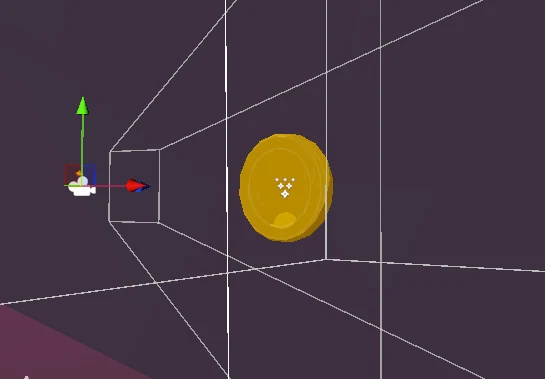
Left: the final result in the HUD. Right: the dedicated camera pointed at the isolated model.



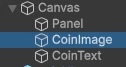
The full chain: culling mask set to the 3DUI layer, output to the coinUI RenderTexture, and that texture assigned to the Canvas Raw Image.
The counter also isn't permanently on screen. It subscribes to OnCoinUpdated, and every time the coin count changes it slides into view, waits a few seconds and hides again. If more coins come in while it's out, the previous coroutine is cancelled and the timer restarts, so collecting coins back to back doesn't make it flicker.
void Start()
{
    originalPosition = uiElement.anchoredPosition;
    movedPosition = new Vector2(originalPosition.x, 425);
    GameManager.Instance.OnCoinUpdated += HandleCoinUpdate;
}

private void MoveUIElement()
{
    if (moveRoutine != null) StopCoroutine(moveRoutine);
    moveRoutine = StartCoroutine(MoveAndReturnSmooth());
}

private IEnumerator MoveAndReturnSmooth()
{
    yield return StartCoroutine(SmoothMove(uiElement.anchoredPosition,
        movedPosition, moveDuration));
    yield return new WaitForSeconds(displayTime);
    yield return StartCoroutine(SmoothMove(uiElement.anchoredPosition,
        originalPosition, moveDuration));
}

void OnDestroy()
{
    GameManager.Instance.OnCoinUpdated -= HandleCoinUpdate;
}
Ground pound, dash and moving platforms
The ground pound runs in two phases. For the first 0.15s it freezes movement and lerps the model's position and rotation into the dive pose; once that window passes it forces vertical velocity to -poundSpeed until it hits the ground. While falling it has an extra collider enabled, and that's what breaks boxes and enemies. On landing, a coroutine returns the model to its original transform.

The ground pound punches through breakable floors and destroys anything it lands on.
private void StartPound()
{
    isPounding = true;
    movementScript.freeze = true;
    poundStartTime = Time.time;

    if (poundCollider != null)
        poundCollider.enabled = true;
}

private void StopPound()
{
    if (poundCollider != null)
        poundCollider.enabled = false;

    if (transformTarget != null)
        StartCoroutine(ResetTransform());

    if (movementScript.grounded && audioSource != null && poundLandingSound != null)
        audioSource.PlayOneShot(poundLandingSound);

    movementScript.freeze = false;
    isPounding = false;
}
The dash is air only and limited to once per jump: it resets on touching the ground, on top of having its own cooldown. It applies an impulse combining the model's forward with an upward component, and flags the state machine so the dashing state keeps momentum on the way out.

Air dash, limited to one per jump.
private void Dash()
{
    if (dashCdTimer > 0) return;
    dashCdTimer = dashCd;

    pm.dashing = true;
    pm.maxYSpeed = maxDashYSpeed;

    GameObject playerObj = transform.Find("PlayerObj").gameObject;
    Vector3 forceToApply = playerObj.transform.forward * dashForce
        + Vector3.up * dashUpwardForce;

    if (resetVel)
        rb.linearVelocity = Vector3.zero;

    rb.AddForce(forceToApply, ForceMode.Impulse);

    Invoke(nameof(ResetDash), dashDuration);
    hasDashed = true;
}
Moving platforms were the classic problem of carrying a Rigidbody without it sliding off. The fix ended up being twofold: on entering, the player is parented to the platform, and on top of that OnTriggerStay computes the platform's position delta for that frame and applies it to the Rigidbody with MovePosition. The platform only activates once someone steps on it, and on exit it walks up the hierarchy to unparent the right object.

The platform starts when the player steps on, running its waypoints one way and back.
private void OnTriggerStay(Collider other)
{
    if (other.CompareTag("Player"))
    {
        Vector3 deltaPosition = transform.position - previousPosition;
        Rigidbody playerRigidbody = other.GetComponent<Rigidbody>();
        if (playerRigidbody != null)
        {
            Vector3 newPosition = playerRigidbody.position + deltaPosition;
            playerRigidbody.MovePosition(newPosition);
        }
        previousPosition = transform.position;
    }
}
Kart mode
This was the other half of the original idea. One key press turns the character into a kart anywhere in the level. The swap is handled by a ModeSwapController that freezes physics, stores the Rigidbody's velocity and angular velocity, enables and disables the two sets of scripts and cameras, and restores the velocity on unfreezing, so you don't lose momentum by transforming.

Transforming from character into kart, with physics frozen across the swap.
IEnumerator SwapModesCoroutine(float totalFreezeTime)
{
    FreezePhysics(true);
    yield return new WaitForSeconds(totalFreezeTime / 2);

    SwapModes();

    yield return new WaitForSeconds(0.1f);
    FreezePhysics(false);
    isSwapping = false;
}

void FreezePhysics(bool freeze)
{
    foreach (var rbState in rigidbodyStates)
    {
        if (freeze)
        {
            rbState.Velocity = rbState.Rigidbody.linearVelocity;
            rbState.AngularVelocity = rbState.Rigidbody.angularVelocity;
            rbState.Rigidbody.isKinematic = true;
        }
        else
        {
            rbState.Rigidbody.isKinematic = false;
            rbState.Rigidbody.linearVelocity = rbState.Velocity;
            rbState.Rigidbody.angularVelocity = rbState.AngularVelocity;
        }
    }
}
The driving is openly inspired by Mario Kart. Drifting decomposes the Rigidbody's velocity into its forward and lateral components using dot products, and only modifies the lateral one, which lets it push the kart out of the corner without touching forward speed. The driftFactor decays the longer the drift is held, so the push is more aggressive at the start.
On top of that sits a mini turbo charge system: alternating left and right during a drift steps the charge up through phases, each phase has its own particle color and sound, and releasing at max charge gives a boost whose duration depends on the charge.

Debugging the drift in the editor: green is forward velocity, red is lateral, blue is the kart's forward.
void ApplyDriftForce()
{
    if (!isSliding) return;

    if (isSliding && touchingGround && CurrentSpeed > 50
        && (leftKeyPressedOnce || rightKeyPressedOnce))
    {
        float driftFactor = Mathf.Lerp(1.2f, 0.8f, driftPhase / maxDriftPhase);

        Vector3 currentVelocity = rb.linearVelocity;

        Vector3 forwardVelocity =
            Vector3.Dot(currentVelocity, transform.forward) * transform.forward;
        Debug.DrawRay(transform.position, forwardVelocity, Color.green);
        Vector3 lateralVelocity =
            Vector3.Dot(currentVelocity, transform.right) * transform.right;
        Debug.DrawRay(transform.position, lateralVelocity, Color.red);

        float lateralAdjustmentMagnitude = 20f;
        if (driftRight && isSliding)
            lateralVelocity -= transform.right
                * lateralAdjustmentMagnitude * driftFactor;
        else if (driftLeft && isSliding)
            lateralVelocity += transform.right
                * lateralAdjustmentMagnitude * driftFactor;

        float targetAngle = (driftRight ? 1 : -1) * 15f * driftFactor;
        Quaternion targetRotation = Quaternion.Euler(0, targetAngle, 0);
        transform.rotation = Quaternion.Slerp(transform.rotation,
            transform.rotation * targetRotation, Time.deltaTime * 1.5f);

        Vector3 newVelocity = forwardVelocity + lateralVelocity;
        newVelocity.y = currentVelocity.y;

        rb.linearVelocity = newVelocity;
    }
}
For all that, the kart is the part of the project that aged worst. It works, it drifts, and the mini turbos charge and release, but next to the character controller it's noticeably less polished and less well integrated into the level. With the time I had left I chose to leave it as a secondary mode rather than cut into the platforming side.
What I took from it
The most useful thing about this project wasn't the individual mechanics, it was learning to decouple them. The movement state machine, the freeze/restricted flags and the GameManager events are what let the ground pound, ledge grabbing and the kart swap each take control of the character without any of them needing to know about the others.
And the scope lesson: trying to build two games at once, a platformer and a kart racer, is exactly what left one of them below the level of the other.
Sobre el proyecto
GlimmerGear fue mi proyecto final de grado superior: un juego de plataformas 3D en tercera persona hecho entero en solitario con Unity 2023.3 y C#. La idea inicial era un híbrido entre plataformas y karts, donde en cualquier momento podías transformarte de personaje a kart y seguir por el mismo escenario conduciendo.
Al final la mitad de plataformas es la que se llevó casi todo el trabajo y es la parte que mejor quedó. El kart también recibió muchísimo tiempo, y llegó a ser bastante funcional (con derrapes, carga de mini turbo y boosts), pero no llegó al mismo nivel de acabado que el resto del juego. No lo descarté, pero se quedó como un modo secundario.
El controlador de personaje
El personaje es un Rigidbody movido por fuerzas, no un CharacterController. El núcleo es una máquina de estados (MovementState) con estados de andar, correr, aire, agacharse, deslizarse, correr por paredes, dash y dos estados especiales de bloqueo (freeze y unlimited) que usan otras mecánicas para tomar el control temporalmente.
Cada estado tiene su propia velocidad deseada, y en vez de cambiarla de golpe hay una corrutina que interpola entre la velocidad anterior y la nueva. Eso permite conservar la inercia: si sales de un dash o de un deslizamiento a gran velocidad, no te frenas en seco, vas bajando poco a poco hasta la velocidad normal. También hay coyote time, doble salto, manejo de pendientes con AddForce hacia abajo para no despegar en las bajadas, y un multiplicador de aire independiente.
Movimiento base: aceleración por fuerzas, control en el aire y salto.
private void MovePlayer()
{
    if (restricted || state == MovementState.dashing) return;

    moveDirection = orientation.forward * verticalInput
        + orientation.right * horizontalInput;
    moveDirection.Normalize();

    if (!grounded && IsAboutToHit()) {
        float reducedSpeed = moveSpeed * 0.1f;
        rb.AddForce(moveDirection * reducedSpeed * 10f * airMultiplier,
            ForceMode.Force);
    } else {
        rb.AddForce(moveDirection * moveSpeed * 10f * airMultiplier, ForceMode.Force);
    }

    if (OnSlope() && !exitingSlope) {
        rb.AddForce(GetSlopeMoveDirection(moveDirection) * moveSpeed * 20f,
            ForceMode.Force);
        if (rb.linearVelocity.y > 0) {
            rb.AddForce(Vector3.down * 80f, ForceMode.Force);
        }
    } else if (grounded) {
        rb.AddForce(moveDirection * moveSpeed * 10f, ForceMode.Force);
    }

    rb.useGravity = !OnSlope() || wallrunning;
}
MovePlayer: las pendientes usan su propia dirección proyectada y una fuerza hacia abajo para que el personaje no salga volando al bajar cuestas.
Manos flotantes
El personaje no tiene brazos: las manos son dos objetos sueltos que flotan a su lado. Cada mano lleva un FloatingMovement que la mueve en el eje Y con un seno y la inclina hacia delante cuando hay input de movimiento, volviendo suavemente a su rotación original cuando te paras.
En reposo las manos suben y bajan con un seno; al moverte se inclinan hacia delante.
private void Update()
{
    if (isFloatingEnabled)
    {
        float newLocalY = initialLocalY
            + Mathf.Sin(Time.time * floatSpeed) * floatAmplitude;
        transform.localPosition = new Vector3(
            transform.localPosition.x, newLocalY, transform.localPosition.z);

        float horizontalInput = Input.GetAxisRaw("Horizontal");
        float verticalInput = Input.GetAxisRaw("Vertical");
        bool isMoving = (horizontalInput != 0 || verticalInput != 0);

        if (isMoving)
        {
            Quaternion targetRotation =
                Quaternion.Euler(forwardTiltAngle, 0, 0) * initialLocalRotation;
            transform.localRotation = Quaternion.Slerp(transform.localRotation,
                targetRotation, Time.deltaTime * 5.0f);
        }
        else
        {
            transform.localRotation = Quaternion.Slerp(transform.localRotation,
                initialLocalRotation, Time.deltaTime * 5.0f);
        }
    }
}
Como las manos son objetos independientes, otras mecánicas pueden apagar el flotado y tomar el control de su posición, que es justo lo que hace el agarre de cornisas.
Diálogos con NPCs
Los diálogos van por trigger. El collider del jugador detecta NPCs por capa o por tag, y le pasa el nombre del GameObject al componente de diálogo, que lo usa como clave en un diccionario de líneas. El texto se escribe letra a letra en una corrutina con un sonido de tecleo por carácter, y si haces clic mientras está escribiendo, la línea se completa de golpe en vez de pasar a la siguiente.
También escribí los diálogos de varios NPCs, manteniéndolos breves y con un tono juguetón para darles personalidad y guiar al jugador de forma natural hacia retos, recompensas y trucos de movimiento.
Al acercarte a un NPC aparece el cuadro de diálogo y el texto se escribe carácter a carácter.
private void OnTriggerEnter(Collider other)
{
    if ((other.gameObject.layer == LayerMask.NameToLayer("NPC")
        || other.CompareTag("NPC")) && canTriggerDialogue)
    {
        dialogueComponent.StartDialogue(other.gameObject.name);
        canTriggerDialogue = false;
        hasBeenEnabled = true;
    }
}
IEnumerator TypeLine()
{
    if (dialogues.ContainsKey(currentNPC) && index < dialogues[currentNPC].Length)
    {
        foreach (char c in dialogues[currentNPC][index].ToCharArray())
        {
            textComponent.text += c;
            if (audioSource && typingSound)
            {
                PlayTypingSound();
            }
            yield return new WaitForSeconds(typingSpeed);
        }
    }
}
Usar el nombre del GameObject como clave hizo que añadir un NPC nuevo fuera solo añadir una entrada al diccionario, sin tocar nada más.
Agarre de cornisas
La detección lanza tres raycasts en paralelo desde la parte alta de la cápsula (centro, izquierda y derecha) hacia delante, y solo se ejecuta cuando el jugador está cayendo (rb.linearVelocity.y >= 0 sale directamente). Si alguno impacta contra una cornisa lo bastante cerca, se entra en el estado de agarre.
Ahí el Rigidbody se pone en kinematic, el movimiento normal se congela con pm.freeze, se bloquea la rotación mirando a la pared y una corrutina lleva al personaje a la posición exacta de agarre. Hay un cooldown por cornisa para que no te vuelvas a enganchar inmediatamente a la misma que acabas de soltar.
Agarre y salto entre cornisas, con las manos colocándose sobre el borde.
private void LedgeDetection()
{
    if (rb.linearVelocity.y >= 0) return;

    Vector3 topCenter = transform.position
        + Vector3.up * (playerCollider.height - playerCollider.radius);
    Vector3 rayLeft  = topCenter - transform.right * playerCollider.radius * 0.3f;
    Vector3 rayRight = topCenter + transform.right * playerCollider.radius * 0.3f;
    Vector3[] rayOrigins = { topCenter, rayLeft, rayRight };

    foreach (Vector3 origin in rayOrigins)
    {
        RaycastHit hit;
        if (Physics.Raycast(origin, orientation.forward, out hit,
            ledgeDetectionLength, whatIsLedge))
        {
            Debug.DrawRay(origin, orientation.forward * ledgeDetectionLength,
                Color.green);
            if (Vector3.Distance(transform.position, hit.point) < maxLedgeGrabDistance
                && CanGrabLedge(hit.transform))
            {
                EnterLedgeHold(hit.point, hit.transform);
                break;
            }
        }
        else
        {
            Debug.DrawRay(origin, orientation.forward * ledgeDetectionLength,
                Color.red);
        }
    }
}
Como las manos son objetos sueltos, hay que decirles explícitamente que dejen de flotar y se coloquen sobre el borde. El HandManager vigila el estado de agarre, desactiva el FloatingMovement de ambas manos y las interpola hasta un offset configurado a mano; al soltarse, una corrutina con retardo vuelve a activar el flotado, pero solo si no se ha vuelto a agarrar ni se acaba de saltar.
private void MoveHandsToLedge()
{
    Vector3 targetPositionLeft  = leftHandStartPos + grabbingOffsetLeft;
    Vector3 targetPositionRight = rightHandStartPos + grabbingOffsetRight;

    leftHand.localPosition = Vector3.Lerp(leftHand.localPosition,
        targetPositionLeft, Time.deltaTime * ledgeGrabbingScript.moveToLedgeSpeed);
    rightHand.localPosition = Vector3.Lerp(rightHand.localPosition,
        targetPositionRight, Time.deltaTime * ledgeGrabbingScript.moveToLedgeSpeed);
}

private IEnumerator EnableFloatingAfterDelay(float delay)
{
    yield return new WaitForSeconds(delay);

    if (!ledgeGrabbingScript.holding && !ledgeGrabbingScript.hasJustJumped)
    {
        leftHandFloatingMovement.enabled = true;
        rightHandFloatingMovement.enabled = true;
    }
}
Monedas, cajas y el GameManager
Las cajas se rompen al recibir el collider de ataque del jugador (tag Destroyer). Al romperse instancian el efecto de partículas, crean un reproductor de audio temporal para que el sonido sobreviva a la destrucción del objeto, y sueltan monedas aplicando a cada una una fuerza con dirección y magnitud aleatorias.
Las cajas sueltan monedas con impulsos aleatorios, y las monedas se atraen hacia el jugador al entrar en su radio.
private void BreakBox()
{
    Instantiate(breakEffect, transform.position, Quaternion.identity);

    if (breakSound != null)
    {
        GameObject tempAudioPlayer = new GameObject("TempAudioPlayer");
        tempAudioPlayer.transform.position = transform.position;
        TemporaryAudioPlayer audioPlayerScript =
            tempAudioPlayer.AddComponent<TemporaryAudioPlayer>();
        audioPlayerScript.soundToPlay = breakSound;
    }

    for (int i = 0; i < numberOfCoins; i++)
    {
        GameObject coin = Instantiate(coinPrefab, transform.position,
            Quaternion.identity);
        Rigidbody rb = coin.GetComponent<Rigidbody>();
        if (rb != null)
        {
            Vector3 forceDirection = new Vector3(
                Random.Range(-2f, 2f), 2, Random.Range(-2f, 2f));
            forceDirection.Normalize();
            float forceMagnitude = Random.Range(3f, 6f);
            rb.AddForce(forceDirection * forceMagnitude, ForceMode.VelocityChange);
        }
    }
    Destroy(gameObject);
}
Cada moneda gira sobre sí misma y, cuando el jugador entra en su radio de atracción, deja de comportarse como física y se mueve directamente hacia él con MoveTowards. Las monedas nacen con los colliders desactivados durante un segundo para que no se recojan solas en el mismo frame en el que se rompe la caja.
void Update()
{
    transform.Rotate(0, rotationSpeed * Time.deltaTime, 0);

    if (!attractionEnabled) return;

    float distance = Vector3.Distance(transform.position, player.transform.position);

    if (distance <= attractDistance && !isAttracted) isAttracted = true;

    if (isAttracted)
        transform.position = Vector3.MoveTowards(transform.position,
            player.transform.position, speed * Time.deltaTime);

    if (isAttracted && distance <= collectionProximity) CollectCoin();
}
Todo desemboca en un GameManager singleton con DontDestroyOnLoad, que guarda las monedas y engranajes con setters privados y lanza un evento de C# en cada cambio. Nada del juego lee el contador directamente: la UI y cualquier otro sistema se suscriben a OnCoinUpdated.
public static GameManager Instance { get; private set; }

public int Coins { get; private set; }
public int Gears { get; private set; }

public event Action<int> OnCoinUpdated;
public event Action<int> OnGearUpdated;

public void AddCoins(int amount)
{
    Coins += amount;
    OnCoinUpdated?.Invoke(Coins);
}
Ese mismo sistema de monedas se reutiliza para los golpes: al recibir daño el jugador suelta hasta 25 monedas de su total con impulsos aleatorios y entra en invulnerabilidad parpadeando (intercambiando el material del mesh cada 0.1 s), y los enemigos sueltan las suyas al morir.
El contador de monedas es una moneda 3D de verdad
El icono de moneda del HUD no es un sprite ni una animación: es el modelo 3D real de la moneda girando. Está en una capa propia (3DUI), con una cámara dedicada cuyo culling mask solo ve esa capa, que renderiza a una RenderTexture llamada coinUI. Esa textura se muestra en un Raw Image dentro del Canvas.
Izquierda: el resultado final en el HUD. Derecha: la cámara dedicada apuntando al modelo aislado.
La cadena completa: culling mask a la capa 3DUI, salida a la RenderTexture coinUI, y esa textura asignada al Raw Image del Canvas.
El contador además no está siempre visible. Se suscribe a OnCoinUpdated, y cada vez que cambian las monedas se desliza a la vista, espera unos segundos y se vuelve a esconder. Si llegan más monedas mientras está fuera, la corrutina anterior se cancela y se reinicia el temporizador, así que recoger monedas seguidas no lo hace parpadear.
void Start()
{
    originalPosition = uiElement.anchoredPosition;
    movedPosition = new Vector2(originalPosition.x, 425);
    GameManager.Instance.OnCoinUpdated += HandleCoinUpdate;
}

private void MoveUIElement()
{
    if (moveRoutine != null) StopCoroutine(moveRoutine);
    moveRoutine = StartCoroutine(MoveAndReturnSmooth());
}

private IEnumerator MoveAndReturnSmooth()
{
    yield return StartCoroutine(SmoothMove(uiElement.anchoredPosition,
        movedPosition, moveDuration));
    yield return new WaitForSeconds(displayTime);
    yield return StartCoroutine(SmoothMove(uiElement.anchoredPosition,
        originalPosition, moveDuration));
}

void OnDestroy()
{
    GameManager.Instance.OnCoinUpdated -= HandleCoinUpdate;
}
Ground pound, dash y plataformas móviles
El ground pound tiene dos fases. Durante los primeros 0.15 s congela el movimiento e interpola la posición y rotación del modelo hasta la pose de picado; pasada esa ventana fuerza la velocidad vertical a -poundSpeed hasta tocar suelo. Mientras cae tiene un collider extra activado, que es el que rompe cajas y enemigos. Al aterrizar, una corrutina devuelve el modelo a su transform original.
El ground pound atraviesa suelos rompibles y rompe todo lo que toca al caer.
private void StartPound()
{
    isPounding = true;
    movementScript.freeze = true;
    poundStartTime = Time.time;

    if (poundCollider != null)
        poundCollider.enabled = true;
}

private void StopPound()
{
    if (poundCollider != null)
        poundCollider.enabled = false;

    if (transformTarget != null)
        StartCoroutine(ResetTransform());

    if (movementScript.grounded && audioSource != null && poundLandingSound != null)
        audioSource.PlayOneShot(poundLandingSound);

    movementScript.freeze = false;
    isPounding = false;
}
El dash solo está disponible en el aire y una vez por salto: se resetea al tocar suelo, además de tener su propio cooldown. Aplica un impulso combinando el forward del modelo con una componente vertical, y avisa a la máquina de estados para que el estado dashing conserve la inercia al terminar.
Dash aéreo, limitado a uno por salto.
private void Dash()
{
    if (dashCdTimer > 0) return;
    dashCdTimer = dashCd;

    pm.dashing = true;
    pm.maxYSpeed = maxDashYSpeed;

    GameObject playerObj = transform.Find("PlayerObj").gameObject;
    Vector3 forceToApply = playerObj.transform.forward * dashForce
        + Vector3.up * dashUpwardForce;

    if (resetVel)
        rb.linearVelocity = Vector3.zero;

    rb.AddForce(forceToApply, ForceMode.Impulse);

    Invoke(nameof(ResetDash), dashDuration);
    hasDashed = true;
}
Las plataformas móviles fueron el clásico problema de arrastrar un Rigidbody sin que se resbale. La solución acabó siendo doble: al entrar, el jugador se emparenta a la plataforma, y además en OnTriggerStay se calcula el delta de posición de la plataforma en ese frame y se aplica al Rigidbody con MovePosition. La plataforma solo se activa cuando alguien se sube, y al salir se recorre la jerarquía hacia arriba para desemparentar el objeto correcto.
La plataforma arranca al subirse el jugador y recorre sus waypoints en un sentido y en el otro.
private void OnTriggerStay(Collider other)
{
    if (other.CompareTag("Player"))
    {
        Vector3 deltaPosition = transform.position - previousPosition;
        Rigidbody playerRigidbody = other.GetComponent<Rigidbody>();
        if (playerRigidbody != null)
        {
            Vector3 newPosition = playerRigidbody.position + deltaPosition;
            playerRigidbody.MovePosition(newPosition);
        }
        previousPosition = transform.position;
    }
}
El modo kart
Esta era la otra mitad de la idea original. Pulsando una tecla el personaje se transforma en kart en cualquier punto del escenario. El cambio lo gestiona un ModeSwapController que congela la física, guarda velocidad y velocidad angular del Rigidbody, activa y desactiva los dos conjuntos de scripts y cámaras, y devuelve la velocidad al soltar la congelación, para que no pierdas la inercia al transformarte.
La transformación de personaje a kart, con la física congelada durante el cambio.
IEnumerator SwapModesCoroutine(float totalFreezeTime)
{
    FreezePhysics(true);
    yield return new WaitForSeconds(totalFreezeTime / 2);

    SwapModes();

    yield return new WaitForSeconds(0.1f);
    FreezePhysics(false);
    isSwapping = false;
}

void FreezePhysics(bool freeze)
{
    foreach (var rbState in rigidbodyStates)
    {
        if (freeze)
        {
            rbState.Velocity = rbState.Rigidbody.linearVelocity;
            rbState.AngularVelocity = rbState.Rigidbody.angularVelocity;
            rbState.Rigidbody.isKinematic = true;
        }
        else
        {
            rbState.Rigidbody.isKinematic = false;
            rbState.Rigidbody.linearVelocity = rbState.Velocity;
            rbState.Rigidbody.angularVelocity = rbState.AngularVelocity;
        }
    }
}
La conducción está claramente inspirada en Mario Kart. El derrape descompone la velocidad del Rigidbody en su componente hacia delante y su componente lateral usando productos escalares, y solo modifica la lateral, lo que permite empujar el kart hacia fuera de la curva sin tocar la velocidad de avance. El driftFactor va bajando conforme se mantiene el derrape, así que el empuje es más agresivo al principio.
Encima de eso hay un sistema de carga de mini turbo: alternar izquierda y derecha durante el derrape sube el estado de carga por fases, cada fase tiene su color de partícula y su sonido, y al soltar en la fase máxima se obtiene un boost cuya duración depende de la carga.
Depurando el derrape en el editor: en verde la velocidad hacia delante, en rojo la lateral y en azul el forward del kart.
void ApplyDriftForce()
{
    if (!isSliding) return;

    if (isSliding && touchingGround && CurrentSpeed > 50
        && (leftKeyPressedOnce || rightKeyPressedOnce))
    {
        float driftFactor = Mathf.Lerp(1.2f, 0.8f, driftPhase / maxDriftPhase);

        Vector3 currentVelocity = rb.linearVelocity;

        Vector3 forwardVelocity =
            Vector3.Dot(currentVelocity, transform.forward) * transform.forward;
        Debug.DrawRay(transform.position, forwardVelocity, Color.green);
        Vector3 lateralVelocity =
            Vector3.Dot(currentVelocity, transform.right) * transform.right;
        Debug.DrawRay(transform.position, lateralVelocity, Color.red);

        float lateralAdjustmentMagnitude = 20f;
        if (driftRight && isSliding)
            lateralVelocity -= transform.right
                * lateralAdjustmentMagnitude * driftFactor;
        else if (driftLeft && isSliding)
            lateralVelocity += transform.right
                * lateralAdjustmentMagnitude * driftFactor;

        float targetAngle = (driftRight ? 1 : -1) * 15f * driftFactor;
        Quaternion targetRotation = Quaternion.Euler(0, targetAngle, 0);
        transform.rotation = Quaternion.Slerp(transform.rotation,
            transform.rotation * targetRotation, Time.deltaTime * 1.5f);

        Vector3 newVelocity = forwardVelocity + lateralVelocity;
        newVelocity.y = currentVelocity.y;

        rb.linearVelocity = newVelocity;
    }
}
Con todo, el kart es la parte del proyecto que peor envejeció. Funciona, se derrapa y los mini turbos cargan y sueltan, pero comparado con el control del personaje se nota menos pulido y peor integrado en el nivel. Con el tiempo que quedaba preferí dejarlo como modo secundario antes que recortar la parte de plataformas.
Lo que me llevé
Lo más útil de este proyecto no fueron las mecánicas sueltas sino aprender a desacoplarlas. La máquina de estados de movimiento, las banderas freeze/restricted y los eventos del GameManager son lo que permitió que el ground pound, el agarre de cornisas y el cambio a kart pudieran tomar el control del personaje sin que ninguno tuviera que conocer al resto.
Y la lección de alcance: intentar hacer dos juegos a la vez, plataformas y karts, hizo que uno de los dos acabara por debajo del nivel del otro.